
7 Easy-to-Use CRM for Designers to Streamline Your Business


A designer friend of mine was panicking recently. His biggest client, who made up almost 25 percent of his revenue, had brought another designer onto the project. He didn’t say anything, but the signal was clear. If he wasn’t careful, he could lose the client.
That kind of stress is something almost every designer faces. Clients are never permanent. Some leave, some stay, and the ones who leave often do so without warning. The key is being ready when it happens.
I told my friend the same thing I tell every digital service provider. Build a process that keeps your business safe even when clients move on. The simplest way to do this is by creating a pipeline and keeping everything organized with a CRM.
A good CRM for designers does more than track leads. It helps systemize your business. It keeps client communication, project history, and invoices in one place. It also makes it easy to upsell services, collect reviews, and maintain relationships with past clients. For teams juggling both client relationships and design projects, finding project management software for designers that integrates with CRM functionality becomes essential.
Every Designer Needs a CRM, But Not All Are Right for You
As a designer, your main job is to sell your services, whether you’re running a UI/UX design agency, doing branding, or web design. But running a service business is more than just creating great work. You need to manage leads, track conversations, handle projects, manage invoices, and make sure nothing slips through the cracks.
A CRM does more than organize leads. The right one helps you:
- Keep conversations on track. All emails, calls, and notes are in one place so nothing is forgotten.
- Track client history and projects. Know every project detail, client preference, and invoice status without digging through files.
- Upsell and grow your services. Spot opportunities for repeat work or bigger projects.
- Collect reviews and referrals. Make it easy for happy clients to share feedback and bring in new business.
- Integrate with other tools. Connect your CRM with project management, invoicing, and design tools so everything works together seamlessly.
The biggest mistake designers make is choosing a sales-focused CRM like HubSpot. These tools are often bloated with features you do not need and miss the essentials that actually help a service business grow. A service-focused CRM fits naturally into your workflow, simplifies client and project management, and helps you systemize your business from start to finish.
Since I work in sales and marketing, my friend asked me to help him find a CRM for graphic designers that does all of this without being overwhelming. I reviewed more than 30 options and narrowed it down to 7 that I believe are the best fit for designers. They are simple, beginner-friendly, and focused on the features you actually need to grow.
7 Best CRM for Designers and Creatives
|
CRM Tool |
Must-Have Features |
Pricing |
Best For |
|---|---|---|---|
|
OneSuite Best Value |
|
Starts at: $29/month for 5 users |
Service-focused agencies seeking best value and complete client lifecycle management |
|
Attio Generous Free |
|
Starts at: $29/user/month |
Modern teams |
|
Monday.com Visual Workflow |
|
Starts at: $15/user/month |
Teams needing project management integration |
|
Zoho |
|
Starts at $7/user/month |
CRM beginners |
|
Airtable/Notion DIY Flexible |
|
Airtable: Start at $20/seat/month |
DIY customization enthusiasts who enjoy building systems |
|
Insightly |
|
Starts at $29/user/month |
Service businesses converting deals to projects |
|
HelloBonsai Freelancer Focused |
|
Starts at $15/user/month. |
Freelance designers and solo agencies handling complete business lifecycle |
OneSuite: Best For Service-Focused Agencies (Most Value for Money)
OneSuite is hands-down the most value-for-money CRM designed specifically for selling services. Unlike traditional CRMs that focus only on lead conversion, OneSuite understands that for design agencies, the real work begins after you win the client. The platform handles the complete service delivery lifecycle from first contact to final payment, with input from over 70 freelancers who became agency owners.
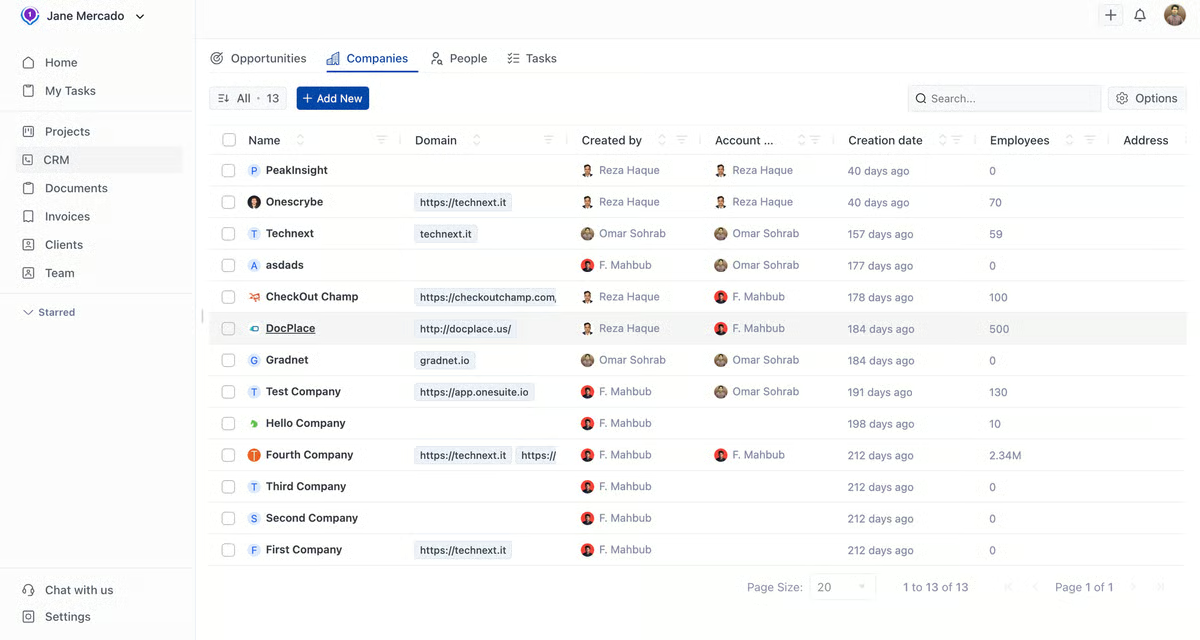
Key Features:
- Visual sales pipelines designed for service sales cycles
- Complete project delivery management with Kanban boards and task tracking
- Client portal where clients can view progress, approve deliverables, and access files
- Professional proposal and contract templates with e-signature
- Automated invoicing with multiple payment gateways (Stripe, PayPal, RazorPay)
- Time tracking and team collaboration tools
- Document management and file sharing
- Email sync and complete communication history
Pros:
- Exceptional value: $29/month for 5 users (less than $6 per person!)
- Purpose-built for service businesses, not generic sales
- Handles complete client lifecycle from lead to project completion
- Client portal keeps clients engaged and reduces support requests
- No learning curve – intuitive interface from day one
- Responsive customer support with real humans
- 14-day free trial without credit card required
Cons:
- Still developing some basic features (as noted in recent reviews)
- Limited customization compared to more mature platforms
- No free plan available long-term
- Fewer third-party integrations than competitors
Pricing:
Freelancer Plan: $29/month (5 users)
Solopreneur Plan: $49/month (10 users)
Growing Agency Plan: $124/month (30 users)
Large Agency Plan: $239/month (70 users)
Note: What stands out is how well it’s built for service businesses. The client portal adds a level of professionalism that’s often seen in agencies charging much higher rates. For design businesses looking to streamline operations, it offers strong value. OneSuite is currently offering a lifetime deal starting at $199, though availability may be limited.
Attio: Best For Modern Teams Who Want Flexibility
Attio represents the new generation of CRM tools with a Notion-like interface that feels familiar to creative professionals. What sets it apart is the generous free plan that actually provides enough functionality for small design agencies to get started. The platform excels at data enrichment, automatically pulling in contact information, company details, and even funding data.

Key Features:
- Automatic contact and company data enrichment
- Customizable pipelines and data structures
- Real-time collaboration with team comments and notes
- AI-powered workflow automation
- Beautiful, modern interface similar to Notion
- Chrome extension for easy lead capture
- Custom reporting and dashboard creation
Pros:
- Generous free plan supports up to 3 users and 50,000 records
- Modern, intuitive interface that creative teams love
- Excellent data enrichment saves time on research
- Highly customizable without being complex
- Strong automation capabilities
- Fast, responsive platform (20% faster than competitors)
Cons:
- Limited native integrations (still growing)
- Some advanced features require higher-tier plans
- Newer platform, so fewer third-party resources
- Can be overwhelming for users wanting simple solutions
Pricing: Free plan for up to 3 users, Plus plan at $29/user/month, Pro at $69/user/month.
Note: Attio really does feel like the future of CRM with its modern interface. The free plan is genuinely useful for small teams, and the data enrichment feature is impressive – it saves hours of manual research.
Monday.com: Best For Teams Needing Project Management Integration
Monday.com isn’t the easiest CRM to learn, but it’s incredibly powerful for design teams who need to manage both client relationships and complex projects in one place. The platform’s strength lies in its visual approach and integration capabilities. With over 200 templates and connections to virtually every tool designers use, Monday can become the central hub for your entire business operation. This makes it particularly valuable for larger UI/UX design companies that need comprehensive project management alongside their CRM.
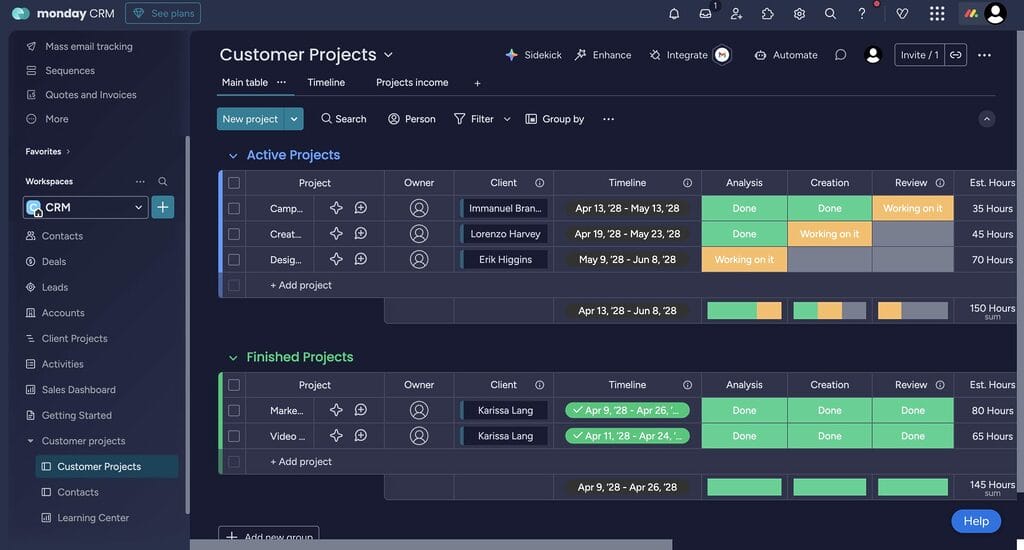
Key Features:
- Visual Kanban, timeline, and calendar views for everything
- Unlimited customizable pipelines and workflows
- Advanced automation and integration capabilities
- Built-in time tracking and resource planning
- Client collaboration through guest access
- Comprehensive reporting and dashboard creation
- Template library with 200+ industry-specific options
Pros:
- Extremely versatile – handles CRM, projects, and operations
- Beautiful, visual interface appeals to designers
- Excellent integration ecosystem
- Scales well from small teams to enterprises
- Strong automation reduces repetitive tasks
- Good mobile apps for on-the-go management
Cons:
- Steeper learning curve than simpler alternatives
- Can feel overwhelming for basic CRM needs
- Pricing can add up quickly for larger teams
- Sometimes too feature-rich for straightforward workflows
Pricing: CRM plans start at $15/user/month for Basic, $20/user/month for Standard, $33/user/month for Pro.
Note: Monday is like having a Swiss Army knife for your business. I set it up for a client’s agency and while it does everything well, the learning curve is real. The team needed two weeks to feel comfortable with it. Great for teams who want to consolidate multiple tools, but be prepared for the initial complexity. The visual approach really clicks with creative professionals once you push through the setup phase.
Zoho (Bigin by Zoho): Connected Ecosystem of Apps
Zoho CRM (especially Bigin by Zoho) is ideal for designers who are using a CRM for the first time. The platform offers a completely free plan with 500 records, making it risk-free to start organizing client relationships. As part of the broader Zoho ecosystem with 40+ business applications, you can start with just CRM and gradually add other tools as your business grows.

Key Features:
- Contact and lead management with detailed tracking
- Sales pipeline with customizable stages and forecasting
- Email integration with Gmail, Outlook, and Zoho Mail
- Basic workflow automation and lead scoring
- Mobile apps for iOS and Android
- Social media integration for contact enrichment
- Basic reporting and analytics dashboard
Pros:
- Completely free plan for up to 3 users (no time limit)
- Genuinely beginner-friendly interface
- Part of comprehensive business ecosystem
- Strong value for money on paid plans
- Good customer support and training resources
- Scales well as your business grows
Cons:
- Free plan has limited customization options
- Advanced features require higher-tier plans
- Can feel basic compared to modern alternatives
- Integration with non-Zoho tools sometimes requires paid plans
Pricing: Free for up to 500 records, Express at $9/user/month, Premier at $15/user/month, Bigin 360 at $21/user/month.
Note: Zoho works like training wheels for CRM in the best possible way. If you are an absolute beginner, then choose Bigin by Zoho; it’s a toned-down version of their full-fledged CRM.
Insightly: CRM + Project Management for Service Businesses
Insightly is built for companies that don’t just sell once, but keep working with clients over time. It ties sales and delivery together, so when a deal closes you can smoothly turn it into a project without losing the context. That makes it a solid fit for design agencies and other service providers.
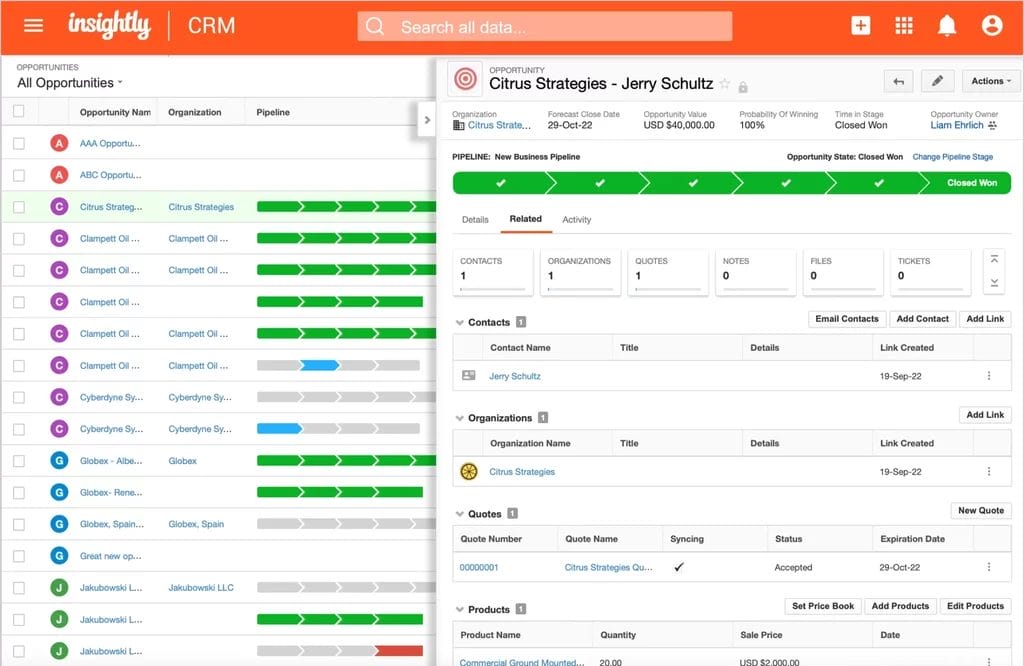
Key Features
- Visual sales pipeline for leads and opportunities
- Convert closed deals into projects while keeping client details and history
- Task, milestone, and project pipeline management inside the CRM
- Email integration with Gmail and Outlook
- File storage and document sharing (note: version history may depend on plan)
- Team collaboration with assignments, roles, and permissions
- Custom dashboards and reports to track KPIs
Pros
- Combines CRM and project management in one platform
- Keeps all communication and client context when moving from sales to delivery
- Highly customizable layouts, fields, and workflows (on higher tiers)
- Strong collaboration tools for teams, with role-based access
- Good choice of integrations and API for connecting with other tools
Cons
- Advanced features (automation, permissions, quotes, deep customization) require higher-tier plans
- Document storage is included, but version history and large capacity may be limited by plan
- Some users report a learning curve with setup and workflow automation
Pricing (billed annually, per user/month)
- Plus — $29: Core CRM, project/task management, basic dashboards and reports
- Professional — $49: Adds workflow automation, more customization, lead assignment/routing
- Enterprise — $99: Adds sandbox environments, advanced permissions, audit logs, product catalogs, pricebooks, and quotes
(14-day free trial available; no free plan anymore.)
HelloBonsai: Best For Freelance Designers and Solo Agencies
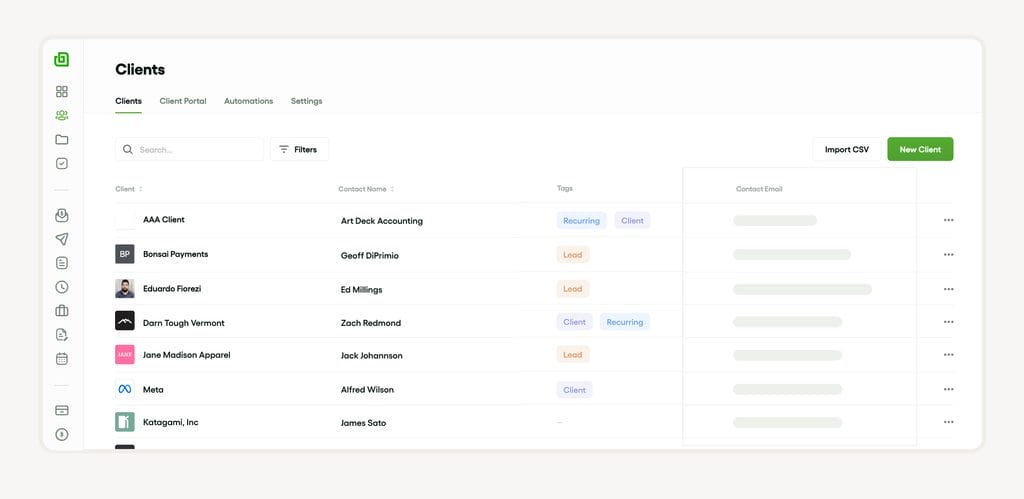
HelloBonsai is purpose-built for freelancers and small creative agencies. Although the CRM feature is limited, other related features make it a worthy platform for designers. The platform handles the complete freelancer lifecycle from initial client contact through project delivery to final payment. It’s like having a business manager built into software, helping solo designers compete with larger agencies.
Key Features:
- Lead management with automated follow-up sequences
- Professional proposal builder with customizable templates
- Contract generation with e-signature capabilities
- Time tracking with automatic invoice generation
- Client portal for project transparency
- Expense tracking and financial reporting
- Workflow automation to reduce manual tasks
Pros:
- Specifically designed for freelancers and creative professionals
- Handles the entire business lifecycle in one platform
- Professional templates make you look established
- Strong automation reduces administrative work
- Client portal enhances customer experience
- Pricing is reasonable for the comprehensive feature set
Cons:
- Limited customization for unique workflows
- More focused on freelancers than larger agencies
- Fewer integrations than enterprise-focused alternatives
- Some advanced features require higher-tier plans
Pricing: Basic plan at $15/user/month, Essentials at $25/user/month, Premium at $39/user/month, Elite at $59/user/month. 7-day free trial available.
Note: If you are looking for a standalone CRM, this is not the right solution for you. The CRM has quite limited features, but other features of Bonsai, like projects, proposals, and invoices, make it a good option.
Airtable or Notion: Best For DIY Customization
While neither Airtable nor Notion is a CRM solution, both offer something unique: the ability to build exactly the client management system you need. Airtable provides a spreadsheet-database hybrid with beautiful visual views, while Notion offers an all-in-one workspace combining databases, documents, and project management. Both have thriving communities sharing CRM templates designed for designers.

Key Features:
- Airtable: Grid, Kanban, calendar, and gallery views of your data
- Notion: Databases with relations, formulas, and rollups
- Both: Extensive template libraries with CRM examples
- Both: Strong automation capabilities
- Both: Custom forms for lead capture
- Both: Collaboration features for team access
- Both: API access for custom integrations
Pros:
- Complete customization – build exactly what you need
- Generous free plans for small teams
- Beautiful, visual interfaces that appeal to designers
- Can combine CRM with project management, notes, and documents
- Strong community support and template sharing
- No vendor lock-in – you own your data structure
Cons:
- Requires time investment to set up properly
- Not traditional CRMs – missing some sales-focused features
- Learning curve to master advanced functionality
- Can become complex as you add more features
- Limited native integrations compared to dedicated CRMs
Pricing:
- Airtable: Free for 5 users, Team at $20/seat/month, Business at $40/seat/month
- Notion: Free for personal use, Plus at $10/member/month, Business at $20/member/month
Note: If you are not ready to move to a CRM right away, you can try one of these platforms instead. They are more DIY, so there is a bit of a learning curve. The good news is most of them include AI features. You can even type a simple prompt like “Create a CRM for designers” and the AI will build one for you.
How to Choose the Right CRM for Your Design Business
Selecting the right CRM depends on your specific situation, team size, and business goals. Here’s how to decide:
Choose OneSuite if: You want the best value for money ($29 for 5 users!) and need a CRM specifically designed for service delivery, not just sales conversion. Ideal for growing design agencies seeking professional client management and project delivery on a single platform.
Choose Attio if: You want modern, flexible CRM capabilities with a generous free plan and don’t need heavy project management features.
Choose Monday.com if: You need both CRM and comprehensive project management in one visual platform and have time to learn a more complex system.
Choose Zoho if: You’re new to CRMs, want to start free, and prefer a traditional approach that’s beginner-friendly.
Choose Airtable/Notion if: You enjoy building custom systems, want complete control over your data structure, and have time to set things up properly.
Choose Insightly if: You frequently convert sales into projects and want both managed in one system with professional features.
Choose HelloBonsai if: You’re a freelancer or small agency that needs to handle the complete business lifecycle from lead to payment in one affordable platform.
Key Takeaways for Designers
The best CRM for your design business is the one you’ll actually use consistently. Here are the essential points to remember:
Start simple. Don’t choose a CRM based on features you might need someday. Pick one that solves your current problems and can grow with you.
Consider your client experience. Features like client portals and professional proposals can significantly improve how clients perceive your business. For agencies handling complex projects, combining CRM with project management software that includes client portals creates a seamless client experience from initial contact through project completion.
Consider your complete workflow. The best CRMs for designers handle more than just lead conversion. They help you deliver projects and maintain client relationships throughout the entire service lifecycle.
Value matters more than features. OneSuite’s $29 for 5 users beats any per-user pricing model for small agencies, while tools like Attio’s generous free plan can work for solo designers or tiny teams.
Budget for growth. While free plans are tempting, make sure the paid tiers align with your growth trajectory and budget.
Test before committing. Every tool on this list offers free trials or plans. Use them to ensure the CRM fits your working style.
Remember, implementing a CRM isn’t just about organizing data. It’s about building systems that protect and grow your business. The right CRM will help you maintain relationships even when clients go quiet, spot upsell opportunities before competitors do, and scale your operations without losing the personal touch that wins projects.
Choose one, set it up properly, and start building the systematic approach to client relationships that will keep your design business thriving regardless of market changes.
Need a Custom CRM Solution?
While off-the-shelf CRM tools work well for most design businesses, sometimes you need something built specifically for your unique workflow. At Technext, we provide development services with a specialization in building custom CRM solutions for different industries.
If you or your clients require a CRM that perfectly matches specific business processes, integrates with unique tools, or handles specialized workflows that generic solutions can’t address, we’d love to discuss how we can help.
Learn more about our custom development services or get in touch to explore how we can build the perfect CRM solution for your business.

Globally Recognised by B2B marketplaces
Kick start with your dedicated squad in Technext
Skip the hiring headache. NDA first, transparent rates, agile delivery from day-1.
No commitment • Reply within 2hrs

S. Polash
Sr. Engineer

Reza H.
Project Manager

Desh C.
Lead Developer

Imran K.
UI/UX Lead

