
7 Best Client Portal Software for Small Businesses in 2025

Picture this: You send a client an important contract on Tuesday. By Friday, they’re asking for it again. You resend it. Then comes Monday, and they can’t find last month’s invoice. Sound familiar?
If you’re spending more time hunting through old emails than actually working, you’re not alone. Most small business owners lose 5-7 hours per week just managing client communications and file requests.
A client portal solves this by creating a single hub where clients can access everything they need. But here’s what most articles won’t tell you: not all business portal software is created equal. Many tools are built for enterprises with big budgets and IT teams, not for small businesses running lean.
We tested over 30 client portal software, comparing features, pricing, and real user experiences. What we found surprised us. The most expensive options weren’t always the best, and some “simple” tools lacked critical features that small businesses actually need.
Quick Match: Find Your Perfect Platform
Digital Marketing Agencies: OneSuite, Service Provider Pro, UseQueue
Design & Creative Services: UseQueue, OneSuite, FuseBase
Legal & Financial Services: MOXO, Clinked
Consulting Firms: OneSuite, FuseBase, MOXO
SaaS & E-commerce Support: Zendesk
Healthcare Providers: MOXO, Clinked
What Actually Is Client Portal Software?
Think of a client portal as a private workspace that lives in the cloud. Your clients log in with their own credentials and see only their projects, files, and communications. Nothing from other clients, just their stuff.
For example, imagine you run a marketing agency. Instead of emailing campaign reports, design files, and invoices separately, your client logs into their portal. Everything is there: the latest campaign performance, design mockups waiting for approval, and this month’s invoice ready to pay. They leave a comment on the design, and you get notified instantly.
That’s the basic idea. But modern client portal software for small businesses goes further. The best platforms include project tracking, automated workflows, integrated payments, and tools that actually save you time instead of adding more software to manage.
Must-Have Features in Client Portal Software for Small Businesses
Before we look at specific tools, let’s talk about what actually matters. Based on feedback from hundreds of small business owners, here are the features that make the biggest difference:
1. Secure File Sharing and Storage
Your clients need access to contracts, invoices, and project files without digging through email threads. Look for:
- Simple drag-and-drop uploads
- Granular permission controls (view-only vs. edit access)
- Automatic file versioning so nobody works on outdated documents
- Bank-level encryption (256-bit SSL minimum)
Why it matters: Email attachments get lost. Clients forward sensitive files to wrong people. A proper portal keeps everything secure and organized.
2. Built-In Communication Tools
Email creates chaos. Messages get buried, context disappears, and threads become impossible to follow. Better business portal software includes:
- Direct messaging within projects or files
- Comment threads on specific documents
- @mentions to tag team members or clients
- Email notifications that don’t overwhelm
Real-world benefit: Instead of 15 back-and-forth emails about a design revision, clients leave comments directly on the file. You respond in context. Done.
3. Online Invoicing and Payments
Chasing payments wastes time. Your portal should handle:
- Invoice creation with your branding
- Real-time payment status (paid, pending, overdue)
- Multiple payment methods (credit card, ACH, PayPal)
- Automated reminders for unpaid invoices
The difference: Businesses that use integrated payment systems in their client portal software report getting paid 40% faster on average.
4. Project and Task Management
Clients shouldn’t need to email you for project updates. They should see progress in real time. Look for:
- Visual project boards (Kanban or list views)
- Task assignments with due dates
- Progress indicators clients can check themselves
- Automatic status updates
What this prevents: The constant “What’s the status?” emails that interrupt your workflow.
5. Client Self-Service Dashboard
The best client portal softwares give clients independence. They should be able to:
- View all active and past projects
- Download invoices and receipts
- Update their contact information
- Access knowledge base articles or FAQs
Time saved: Most businesses report 60-70% fewer “where is my invoice” or “can you resend that file” requests.
6. Custom Branding and White Labeling
Your portal should look like your business, not generic software. Essential branding options include:
- Your logo and brand colors
- Custom domain (portal.yourbusiness.com)
- Branded email notifications
- Custom welcome messages
Why this matters: Professional branding builds trust. Clients see a cohesive experience, not a third-party tool.
Comparison Table of Client Portal Software Solutions
This table highlights key features, pricing, and Ratings, helping businesses find the best solution for client collaboration, invoicing, and communication.
|
Software |
Start From |
Best For |
File Sharing |
Invoicing |
White Label |
G2 Rating |
|---|---|---|---|---|---|---|
|
OneSuite |
$29/5-user |
Service agencies |
✓ |
✓ |
✓ |
4.7/5 |
|
UseQueue |
$49/2 users |
Subscription services |
✓ |
✓ |
✓ |
4.9/ 5) |
|
Service Provider Pro |
$99/5 users |
Productized services |
✓ |
✓ |
✓ |
4.4/5 |
|
Clinked |
$119/100 users |
Security-focused |
✓ |
✗ |
✓ |
4.8/5 |
|
MOXO |
Custom |
Complex workflows |
✓ |
✗ |
✓ |
4.5/5 |
|
FuseBase |
$48/3 users |
Document creation |
✓ |
✓ |
✓ |
4.7/5 |
|
Zendesk |
$55/agent |
Support tickets |
✓ |
✗ |
✓ |
4.3/5 |
Top 7 Client Portal Software for Small Businesses
A client portal streamlines communication, project tracking, and invoicing, enhancing client relationships. This guide reviews 7 top solutions, covering features, pricing, and user feedback to help you choose the best fit for your business.
1. OneSuite: Best All-in-One for Service Agencies
OneSuite is a complete business management platform built specifically for service agencies and freelancers. Unlike traditional client portals that only handle file sharing, OneSuite integrates your entire workflow from lead capture to final payment. Think of it as replacing 3-5 separate subscriptions with one unified system where client data flows naturally from initial contact through project delivery to invoice payment.
Who it’s for: Digital marketing agencies, design firms, consultants, freelancers growing into agencies

Standout features:
- CRM built specifically for service businesses.
- Project management with Kanban and List views
- Invoice creation with Stripe, PayPal, RazorPay, and QuickPay integration
- Document sharing with e-signatures
- Branded client portal with real-time updates
- Team management with role-based access
OneSuite Pricing (Monthly Plan)
- Freelancer Plan – Starts at $29/month (5 user)
- Solopreneur Plan – Starts at $59/month (10 users)
- Growing Agency Plan – Starts at $149/month (35 users)
User Feedback: ⭐ 4.7/5 (G2)
✌️ The developer team has thought about every aspect of a team’s day to day need. While using the app, I never felt like I am missing anything. On top of that, there are some features that even changed the way our company is being managed now. Kudos to the devs.
–Trusted Review on G2
???? For the task there is no option to track the time. it has to be entered manually. They have an extention to import leads but time checkin, checkout a important function is missing.
–Trusted Review on G2
Pros & Cons
| ✅ Pros | ❌ Cons |
|---|---|
| Smooth white-label client portal | Newer platform with fewer integrations |
| Excellent value at $29 for 5 user | Still at early development phase. |
| Easy to use and adopt | No forever free plan |
| Unlimited projects, clients, invoices and documents |
2. UseQueue: Best for Subscription Services
UseQueue is purpose-built for creative businesses offering unlimited service subscriptions like design, video editing, or development retainers. Its standout feature is a credit-based system that prevents scope creep while keeping clients happy. When clients exhaust their monthly credits, the system automatically pauses new requests until renewal, eliminating the “unlimited work” nightmare that tanks profitability.
Who it’s for: Unlimited design services, creative subscriptions, video production agencies
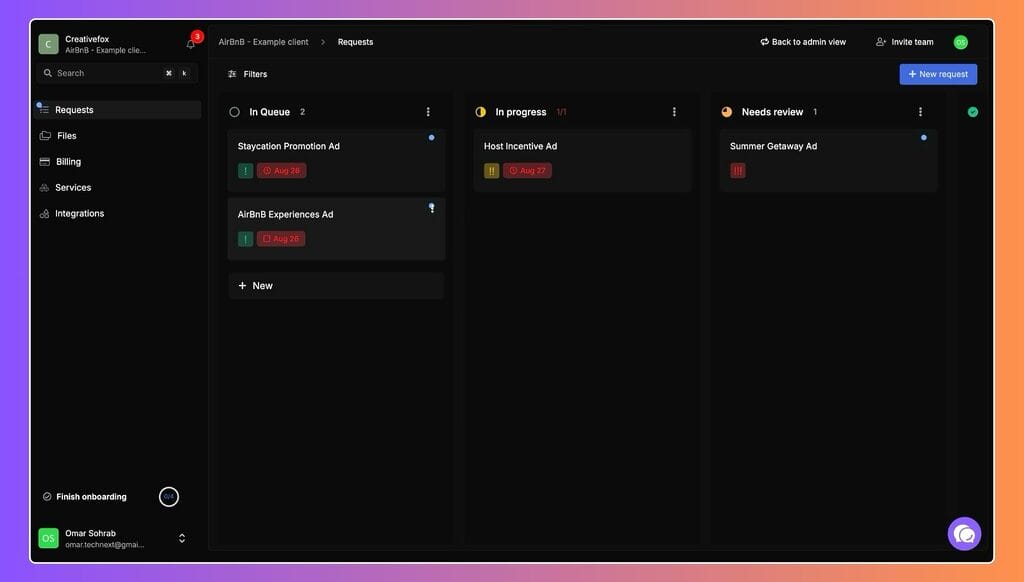
Standout features:
- Credit tracking (allocate credits per subscription)
- Custom request forms
- Click-to-comment on designs, videos, live websites
- Client pause/resume subscriptions
- Automatic credit refills
- Mobile apps (iOS and Android)
- 30+ file types supported
- Kanban task boards
- Time tracking per task
- Invoice generation
Pricing:
- Free: Until your first client (5 days to upgrade after)
- Growth: $49/month (2 users)
- Scale: $149/month (5 users)
No transaction fees. Keep 100% through Stripe.
User Feedback: ⭐4.7 / 5 (G2)
✌️Been using Queue for a few weeks, Five stars easily. Great product, intuitive platform, and a very very responsive team.
–Trusted Review on producthunt
???? Queue lacks somewhat in terms of analytics. There are no additional tools for monitoring, for instance, specific identifiers of active reviewers or constructing trends within the provided feedback.
–Trusted Review on G2
Pros & Cons
| ✅ Pros | ❌ Cons |
|---|---|
| The credit system prevents scope creep | Limited integration options with external tools |
| Credit system prevents scope creep | Limited analytics features |
| Clients control pause/resume | Not ideal for non-subscription businesses |
| Exceptional customer support |
Best for: Design subscription services, video production retainers, development packages, any creative service with recurring revenue. The credit system solves the unlimited service headache.
3. Service Provider Pro: Best for Productized Services
Service Provider Pro transforms how agencies sell standardized services by treating them like e-commerce products rather than custom projects. Built by agency owners who experienced the pain firsthand, SPP’s killer feature is its unique reseller program that lets other agencies white-label and resell your services with automatic payments and synchronized communication—perfect for scaling through partnerships.
Who is it For: SEO agencies, link building, and content services providing productized services.

Standout features:
- Order forms (service catalog)
- Helpdesk with client history
- Multi-currency support
- Built-in CRM
- Reseller program (unique)
- Automated billing
Service Provider Pro (SPP) Pricing (Monthly Plan)
- Basic – $129/month (5 users) – For small shops
- Pro – $299/month (10 users) – For established agencies
- Plus – $1,500/month (50 users) – For high-volume agencies
User Feedback: ⭐ 4.4/5(G2)
✌️ We use it to keep track of partners’ projects, payments and sales tools.
–Trusted Review on G2
???? End to end examples for different business verticals is needed. I may have missed it in the online documentation.
–Trusted Review on G2
Pros & Cons
| ✅ Pros | ❌ Cons |
|---|---|
| Comprehensive client management | Higher pricing for advanced features |
| White-labeled client portal enhances branding | Learning curve for new users |
| Integrated billing and invoicing system | Limited customization in lower-tier plans |
| Robust project management tools |
4. MOXO: Best for Complex Workflows
MOXO specializes in orchestrating multi-stakeholder workflows where different people need different views and capabilities. Founded by the creators of WebEx, it excels when your client projects involve multiple decision-makers—like accounting firms coordinating between CFOs, finance managers, and operations directors. Each person sees exactly what they need through role-based portals, eliminating confusion and delays that plague generic one-size-fits-all systems.
Who it’s for: Financial services, legal, accounting, healthcare

Standout features:
- Workflow automation for complex approval processes
- Role-based portals where each user type sees customized workflows
- End-to-end encryption for all communications
- Digital signature integration built in
- Video conferencing without third-party tools
Moxo’s Pricing
- Custom
User Feedback: ⭐4.5 / 5 (G2)
✌️ What I like most is the responsiveness of the moxo team. They quickly answer questions or take it to the internal team for direction. They have also taken ideas we’ve had for the platform and submitted them for future applications. The team has been very collaborative and helped us achieve our goal with the app a lot faster than anticipated. The platform is relatively easy to use and the team was patient to walk us through the new items. We use our app daily as our main source for internal and client communications.
–Trusted Review on G2
???? There are a lot of QOL features missing. The app feels like a work in progress.
Small Buttons, means our clients miss where they need to upload.
The ability to attach files to chat means its easier for clients to attach in chat instead of in the step itself.
–Trusted Review on G2
Pros & Cons
| ✅ Pros | ❌ Cons |
|---|---|
| Integrates multiple communication tools into one platform | Some users report a learning curve due to the platform’s extensive features |
| Enhances client engagement with real-time collaboration | Occasional performance issues, such as lags during usage |
| Automates workflows, increasing operational efficiency | Limited customization options in certain features |
| Ensures data security with end-to-end encryption | Pricing details are not readily available, requiring direct contact for information |
5. Clinked: Best for Security-Focused Organizations
Clinked is essentially a virtual data room refined for everyday business use without sacrificing enterprise-grade security. With ISO 27001 certification, SOC 2 compliance, and support for GDPR and HIPAA requirements, it’s trusted by over 40,000 users globally including major corporations like Canon and Bacardi. If you handle sensitive client data where “pretty good” security isn’t enough, Clinked delivers the protection regulated industries demand.
Who it’s for: Legal firms, financial advisors, healthcare
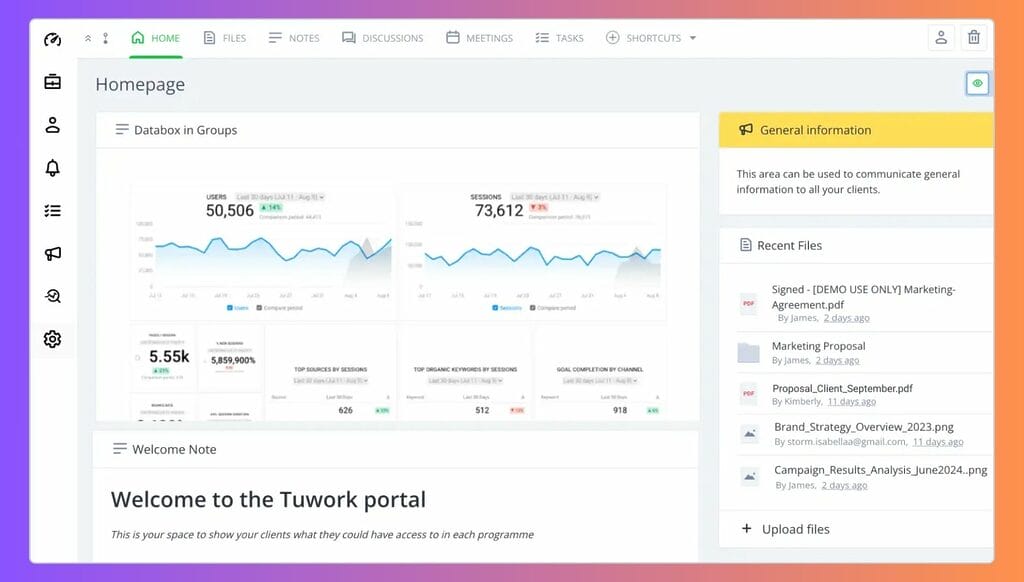
Standout features:
- 256-bit SSL encryption on all files (bank-grade security)
- Role-based access controls get granular
- Discussion threads keep conversations organized
- Mobile apps for iOS and Android
- ISO 27001 certified with GDPR, HIPAA compliance
Clinked Pricing (Monthly Plan, Billed Monthly)
- Lite – $119/month (100 users)
- Standard – $299/month (100 users)
- Premium – $599/month (250 users)
- Enterprise – Custom Pricing (1000+ users, Contact Sales)
User Feedback: ⭐4.8 / 5 (G2)
✌️ Clinked is a professional-looking and reliable portal, which has everything we need for our company. What really sets Clinked apart is its user-friendly design and customization options. We’ve been able to personalize our portal to reflect our brand, which not only enhances our professional image but also makes navigation easier for our clients. It’s useful to have all the project information, documents, and updates in one place without needing to ask for updates via email.
–Trusted Review on G2
???? If pressed to say something I don’t like about Clinked, I feel that it is a relatively expensive option compared to some competing platforms, but the versatiiity and breadth of functionality go a long way towards justifying the price.
–Trusted Review on G2
Pros & Cons
| ✅ Pros | ❌ Cons |
|---|---|
| User-friendly interface | Limited spell-check feature |
| Secure platform with robust encryption | Notifications may experience delays |
| Highly customizable to reflect company branding | Limited integrations with other software |
| Cost-effective compared to traditional virtual data rooms (VDRs) | Some users report a learning curve for new features |
6. FuseBase: Best for Document-Heavy Work
FuseBase (formerly Nimbus) combines traditional client portal features with AI-powered document creation tools designed for businesses that live and breathe proposals, reports, and client presentations. Its clever unified link feature means you send all clients the same URL and the system automatically routes each person to their specific portal.
Who it’s for: Proposal-heavy agencies, consultants, legal firms.
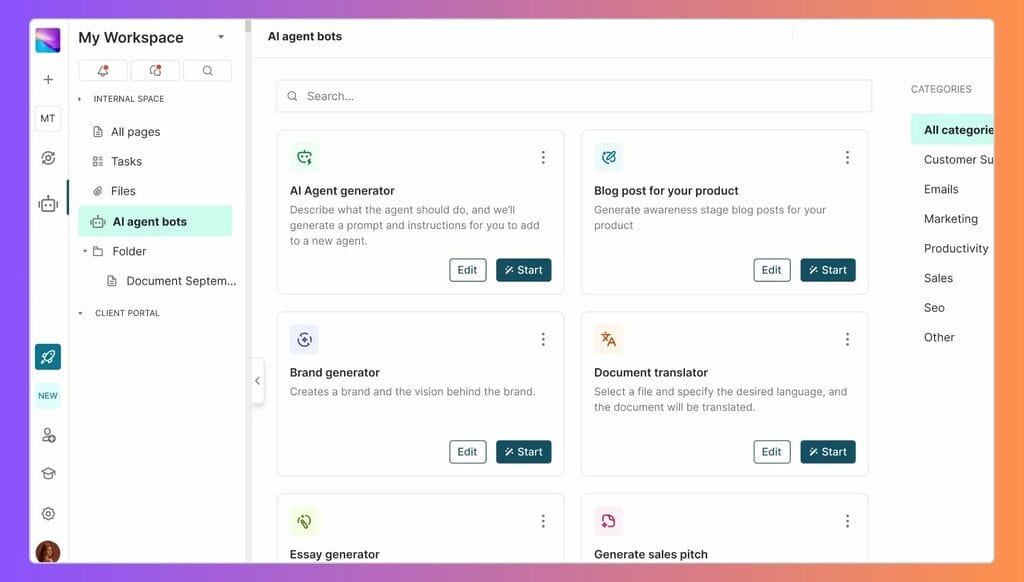
Standout features:
- AI assistant for content creation and translation
- Unified link feature (one link automatically directs each client to their specific portal)
- Interactive document builder with rich media support
- Kanban boards for project management
- Integration with 2,000+ applications
NimbusWeb Pricing (Monthly Plan)
- Essentials – $48/month (3 users)
- Plus – $123/month (3 users)
- Ultimate (White Label) – $248/month (3 users)
User Feedback: ⭐4.7 / 5 (G2)
✌️Using Nimbus Note with my team and clients has been a breath of fresh air. That internal workhub? Perfect for keeping everyone on the same page. And the client portals? Clients love it! It’s like having a personalized dashboard for each client. No more endless email chains or lost files – everything’s right there.
–Trusted Review on G2
???? I liked them as nimbus. Then they changed their direction and it did not serve me well any longer. I canceled my account. The billed me again. I requested reimbursement. They have not responded to ANY of my communication. Fraud!@!
–Trusted Review on G2
Pros & Cons
| ✅ Pros | ❌ Cons |
|---|---|
| User-friendly interface | Some features may be underdeveloped |
| Extensive customization options | Clients may prefer traditional communication methods |
| Robust integration capabilities | Performance speed can be slower compared to alternatives |
7. Zendesk: Best for Support
Zendesk is industry-leading helpdesk software with a support ticket portal—not a client collaboration platform for project-based work. It excels at handling high volumes of customer support questions across multiple channels with powerful AI agents that resolve 80% of common inquiries automatically. However, it’s the wrong tool for agencies, designers, or consultants who need to deliver projects, track deliverables, and collaborate on work rather than just answer support tickets.
Who it’s for: SaaS companies, e-commerce brands providing ticket-based support.

Standout features:
- Multi-channel support (email, chat, phone, social)
- Robust self-service knowledge base builder
- Automated ticket routing and SLA tracking
- AI agents that handle 80%+ of support requests
- Deep analytics and reporting
Zendesk Pricing (Per Agent/Month, Billed Monthly)
- Support Team – $25 (per agent)
- Suite Team – $69 (per agent)
- Suite Professional – $1499 (per agent)
- Suite Enterprise – Custom Pricing (Contact Sales)
User Feedback: ⭐4.3 / 5 (G2)
✌️ The user experience is really simple; it consolidates all communications with customers in one place, whether through email, live chat or phone conversations. The ability to automate workflow tasks such as ticket assignment, response sending and interaction tracking is quite remarkable. As a result, we have been able to devote more time and energy to the conclusion of agreements. We can bring all customer interactions together in one place, they are saved and structured, so no one on the team has to go through multiple systems to find a customer’s history, whether it be via email, chat or a web form.
–Trusted Review on G2
???? No BCC option, for over 4 years, despite numerous suggestions on their forums.. they dont take customer suggestions into account for any future development
–Trusted Review on G2
Pros & Cons
| ✅ Pros | ❌ Cons |
|---|---|
| Versatile and scalable platform | Higher pricing tiers may be costly for small businesses |
| Comprehensive multi-channel support | Some users report a steep learning curve |
| Robust analytics and reporting tools | Advanced features can be complex to configure |
| Extensive integration options | Interface may feel overwhelming to new users |
How to Actually Choose the Right Client Portal Software
Reading features lists is one thing. Making the right choice for your business is another. Here’s how to approach the decision:
Start with Your Biggest Pain Point
Don’t try to solve everything at once. Ask yourself:
- Are clients constantly asking for files you’ve already sent? → Focus on file sharing and organization
- Do projects stall waiting for client feedback? → Prioritize collaboration and commenting features
- Are you chasing late payments? → Make invoicing and payment integration a priority
- Is your team scattered across too many tools? → Consider all-in-one platforms.
Consider the Client Experience
You’re not the only user. Your clients need to navigate the portal too. The best client portal software for small businesses is intuitive enough that clients don’t need training.
Test this by asking: Could my least tech-savvy client figure this out in 5 minutes?
Calculate the Real Cost
Look beyond monthly subscription fees. Consider:
- Time saved: If a portal saves you 5 hours per week at $50/hour, that’s $1,000/month in value
- Payment speed: Getting paid 2 weeks faster improves cash flow significantly
- Team efficiency: Reducing context-switching between tools adds up
- Client satisfaction: Professional systems retain clients longer
A $200/month tool that saves $2,000/month in time is a bargain. A $50/month tool that creates more work is expensive.
Test the Migration Process
Switching from email-based systems to a client portal takes planning. Good software providers offer:
- Migration support or onboarding calls
- Template libraries to get started quickly
- Import tools for existing contacts and projects
- Training resources for your team and clients
Ask about this during trials. A platform that’s hard to implement might never get fully adopted.
Check Integration Capabilities
Your client portal software shouldn’t exist in isolation. It should connect with:
- Accounting software (QuickBooks, Xero)
- Payment processors (Stripe, PayPal)
- Email platforms (Gmail, Outlook)
- Calendar systems (Google Calendar, Outlook)
- Communication tools (Slack, Teams)
The more native integrations, the less manual data entry.
Don’t Ignore Security
This should go without saying, but client data is your responsibility. Minimum security requirements include:
- SSL encryption for data in transit
- Encryption at rest for stored files
- Two-factor authentication options
- Role-based access controls
- Regular security audits (ask providers about this)
- Compliance certifications if you’re in regulated industries
Plan for Growth
Choose business portal software that scales with you. Ask:
- What happens when I add more team members?
- How does pricing change as I grow?
- Are there user or storage limits?
- Can I add features later without switching platforms?
Starting with a limited tool and migrating later wastes time and money.
Footnote
Every business is unique, so does the people behind them. Some prefer a customizable solution, while others prefer an easy-to-use platform, so we cannot say that one platform is best for you. I suggest you to try at least 3 to finalize one. Most of these platforms offer free trials. Pick the top 3 that match your needs, test them for two weeks, and measure the difference. In the end, you’ll
If you need help implementing or customizing your portal solution, Technext can assist with custom development to ensure your portal perfectly fits your workflow.