
How Technext Built a Scalable, Production-Ready AWS Stack for Next.js and Express with SST

Deploying a full-stack application (Next.js frontend, Express backend, MySQL database) to AWS used to require clicking through a hundred console pages or writing thousands of lines of CloudFormation.
Today, I want to break down how I automated my entire infrastructure using SST (Serverless Stack). This setup is production-ready, secure, and separates “slow-changing” infrastructure (like databases) from “fast-changing” application code.
Whether you are a beginner wondering “What is a VPC?” or an expert looking for a clean Infrastructure-as-Code (IaC) pattern, this guide is for you.
The Architecture at a Glance
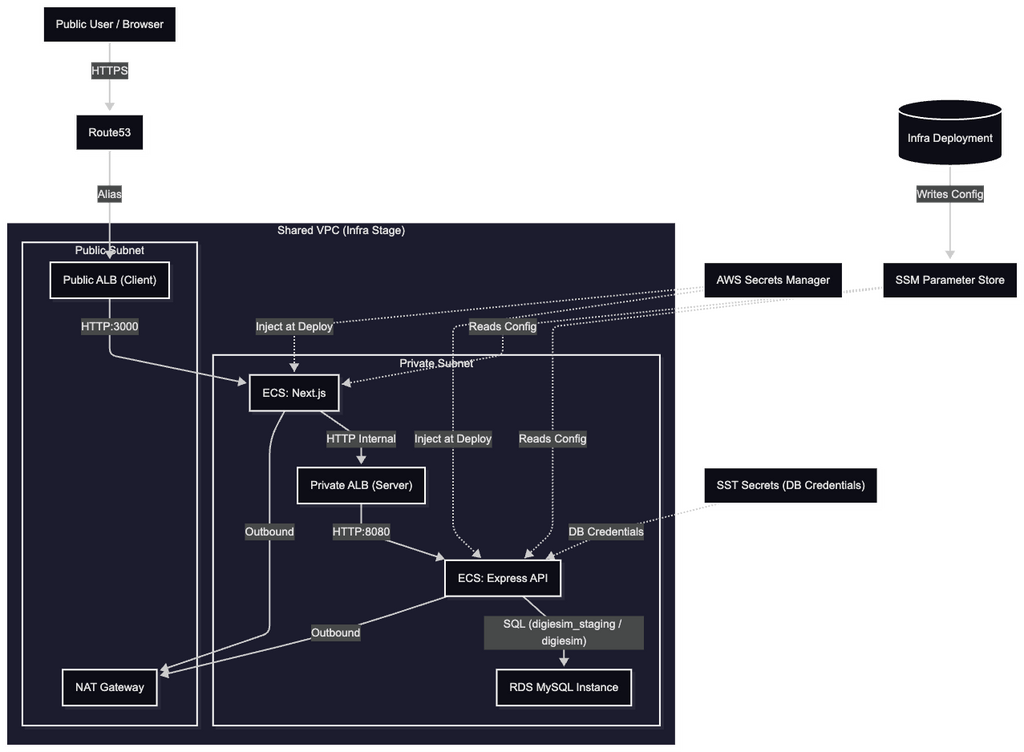
Before we look at the code, let’s visualize what we are building:
- Public Zone: A Next.js frontend running in a container, accessible via a public domain.
- Private Zone: An Express.js backend API, also containerized, but only accessible by the frontend (not the public internet).
- Data Zone: A MySQL database locked inside a private network.
- glue: SSM Parameter Store to share configuration between these layers.
Here is the deep dive into the sst.config.ts that powers this “Digiesim” platform.
The Strategy: The “Infra” vs. “Service” Split
One of the smartest patterns you can adopt in IaC is separating your Stateful resources from your Stateless resources.
- Infrastructure (infra stage): Things that take a long time to create and shouldn’t be deleted often (VPC, Database, ECS Cluster).
- Services (dev, staging, prod stages): Your application code (Next.js, Express) that you deploy 10 times a day.
In the code, we handle this with a simple check:
TypeScript
const INFRA_STAGE = “infra”;
const isInfra = $app.stage === INFRA_STAGE;
This allows us to run sst deploy –stage infra to set up the foundation, and then sst deploy –stage production to push code updates without touching the database.
Part 1: The Foundation (Infrastructure)
If isInfra is true, we build the bedrock.
1. The Network (VPC)
The VPC (Virtual Private Cloud) is our private slice of the AWS cloud.
TypeScript
// Using "managed" NAT (Note: Switch to "ec2" or "fck-nat" for cheaper dev costs!)

const vpc = new sst.aws.Vpc("DigiesimVpc", {
  nat: "managed",
});- Beginner Note: Think of this as the walls around your house. It keeps bad actors out.
- Expert Note: We are using a NAT Gateway so our private containers can talk to the internet (e.g., to pull Docker images or call Stripe) without allowing the internet to call them.
2. The Database (MySQL)
We provision a real EC2-backed MySQL instance inside the VPC.
TypeScript
const db = new sst.aws.Mysql("DigiesimDatabase", {
  version: "8.4.7",
  vpc,
  instance: "t3.micro", // Cost-effective for startups
  transform: {
    instance: (args) => {
      args.publiclyAccessible = false; // Security First!
    },
  },
});
Security Win: By setting publiclyAccessible: false, this database has no public IP. It is physically impossible to connect to it from your laptop without a VPN or bastion host. It is safe.
3. The “Glue” (SSM Parameters)
Since our App and Infra are deployed separately, how does the App know the Database URL? We export the details to AWS Systems Manager (SSM) Parameter Store.
TypeScript
new aws.ssm.Parameter("InfraVpcId", {
  name: "/digiesim/infra/vpc-id",
  value: vpc.id,
});

// ... (Cluster ID, DB Host, DB Port, etc.)
This acts as a “Config Registry” in the cloud.
Part 2: The Application (Services)
When we deploy to staging or production, we skip the infra setup and instead lookup those resources.
1. Rehydration
We fetch the VPC and Cluster IDs from SSM to tell SST where to put our containers.
TypeScript
const vpcIdParam = await aws.ssm.getParameter({ name: “/digiesim/infra/vpc-id” });
const vpc = sst.aws.Vpc.get(“DigiesimVpc”, vpcIdParam.value);
2. The Backend (Express API)
We deploy the backend as a container service.
TypeScript
const api = new sst.aws.Service(`${$app.stage}-DigiesimExpressApi`, {
  cluster,
  loadBalancer: {
    public: false, // INTERNAL ONLY
  },
  // ...
});
Architecture Highlight: Notice public: false. This creates an Internal Load Balancer. The API is reachable only from within the VPC. Your Next.js server (running in the same VPC) can hit it, but a hacker scanning IPs cannot.
The “Magic” Command:
We handle migrations and seeding strictly within the deployment command:
command: [
  "sh",
  "-c",
  "npx prisma migrate deploy && npx prisma db seed && node src/server.js",
]
This ensures that every time we deploy a new version of the code, the database schema is automatically updated before the server starts.
3. The Frontend (Next.js)
Finally, the public face of the app.
TypeScript
const client = new sst.aws.Service(`${$app.stage}-DigiesimNextjsWeb`, {
  cluster,
  loadBalancer: {
    public: true, // Open to the world
  },
  environment: {
    API_URL: `https://${isProd ? "api" : "sapi"}.digiesim.site/api/`,
  },
});
We pass the Internal API URL to the Next.js container. Since Next.js does Server-Side Rendering (SSR), it can talk to the private API over the high-speed AWS internal network.
Part 3: Secrets & Monitoring
Secrets Management
Refusing to hardcode secrets is Rule #1 of DevOps. We use sst.Secret for the database credentials and aws.secretsmanager for external API keys (Stripe, etc.).
TypeScript
// Fetching external secrets securely at runtime
const serverSecret = await aws.secretsmanager.getSecretVersion({ … });
Alarms
We don’t want to wake up to a crashed server. We set up a shared SNS Topic for alarms.
TypeScript
new aws.cloudwatch.MetricAlarm("ServerCpuHigh", {
  metricName: "CPUUtilization",
  threshold: 80,
  alarmActions: [alarmTopicArn.value],
});
If the CPU spikes > 80%, the system automatically emails the dev team.
Why This Rocks
- Cost Control: We use t3.micro instances and can shut down the staging environment easily.
- Security: The Database and API are completely hidden from the public internet.
- Scalability: Both the Client and API services have auto-scaling rules (min: 1, max: 2). If traffic spikes, AWS automatically adds more containers.
- Developer Experience: With SST, this entire infrastructure is defined in TypeScript. We get autocomplete, type safety, and we can use standard logic (if/else) to control our cloud.
Have you tried SST yet? Let me know your thoughts on this architecture in the comments!
The Cost Analysis (Real World Numbers)
This is the part most tutorials skip. How much will this actually cost you?
Based on AWS us-east-1 pricing, here is the monthly breakdown for this exact configuration running 24/7.
Scenario: The “Launch Mode” (Minimum Scale)
- Compute: 1 instance of API, 1 instance of Client (Fargate)
- Database: db.t3.micro
- Traffic: Low
| Resource | Configuration | Est. Monthly Cost | Notes |
| Fargate (Compute) | 2 vCPU, 4GB RAM (Total) | ~$72.00 | Runs 24/7. |
| NAT Gateway | Managed (1 per AZ) | ~$32.85 | High fixed cost. Required for private subnets. |
| Load Balancers | 2 ALBs (1 Public, 1 Private) | ~$32.84 | $16.42 per ALB base price. |
| RDS Database | db.t3.micro + 20GB Storage | **~$14.00** | Includes instance + storage. |
| Secrets Manager | 2 Secrets | $0.80 | $0.40 per secret. |
| Total | **~$151.49 / mo** |
Cost Optimization Tips (How to Save 50%)
If $150/mo is too high for a hobby project, here is how you can slash it:
- Kill the NAT Gateway (~$30 saved):
The config explicitly mentions: nat: “managed”. If you change this to nat: “ec2” (which uses a cheap t4g.nano instance as a NAT), you drop this cost from $32 to ~$3.- Trade-off: You have to manage a tiny EC2 instance.
- Trade-off: You have to manage a tiny EC2 instance.
- Consolidate Load Balancers (~$16 saved):
Currently, you have two Load Balancers (one for client, one for API). You could merge them into a single Public ALB and use Path-Based Routing (e.g., /api/* goes to backend, /* goes to frontend).- Trade-off: Your API becomes public-facing (though you can restrict it via security groups).
- Trade-off: Your API becomes public-facing (though you can restrict it via security groups).
- Use Fargate Spot (~$40 saved):
For dev or staging, you can enable Fargate Spot capacity providers to save up to 70% on compute costs.