
Synapse: Building a Healthcare Audit Dashboard Web App for the US Market
Overview
Managing healthcare audits is not a straightforward job. Auditors jump between clients. Managers track multiple engagements at once. QA reviewers need to know, without digging, what is ready for sign-off and what is not. The client behind Synapse knew this well. But their old system did not.
The interface was slow. Information was scattered. There was no quick way to tell where a client stood or which tasks needed attention that day. The team spent more time navigating the system than actually using it.
Technext was brought in to fix that. The task was to build the entire front-end from scratch, design the admin panel, and create a UI that audit teams could rely on daily.
About Synapse
Synapse is a web-based audit dashboard built for the US healthcare market. It keeps everything in one place: client information, auditor assignments, order tracking, QA progress, and compliance mapping.
The platform serves two main audiences. Managers who oversee multiple clients simultaneously need a fast way to see where things stand across all active engagements. Auditors need to know what tasks are open, what is waiting on them, and what has already moved forward. Synapse was built around these two realities, not around a generic dashboard template.
The Challenge
The client’s website was outdated and slow. But the bigger issue was usability. The front-end did not give users any meaningful visual feedback on audit progress. You could not tell at a glance whether a client was 20% done or 80% done. You had to know where to look, and even then, the data was not laid out in a way that helped.
The compliance mapping side of the platform was an even bigger pain point. Managing the relationship between audit standards, principles, categories, criteria, and control activities is inherently complex. Doing it through a poorly organized UI made it worse.
The client needed a front-end rebuild and a properly structured admin panel. No partial fixes. A full replacement.
Our Approach
We started with requirement analysis. Every user flow got mapped out before a single line of code was written. Auditor assignments, client detail pages, order tracking, the mapping hierarchy, the CMS, reports. Each had its own logic, and the UI had to reflect that without becoming overwhelming. For the visual design, we worked from the Falcon admin theme as a starting point and customized it heavily to fit Synapse.
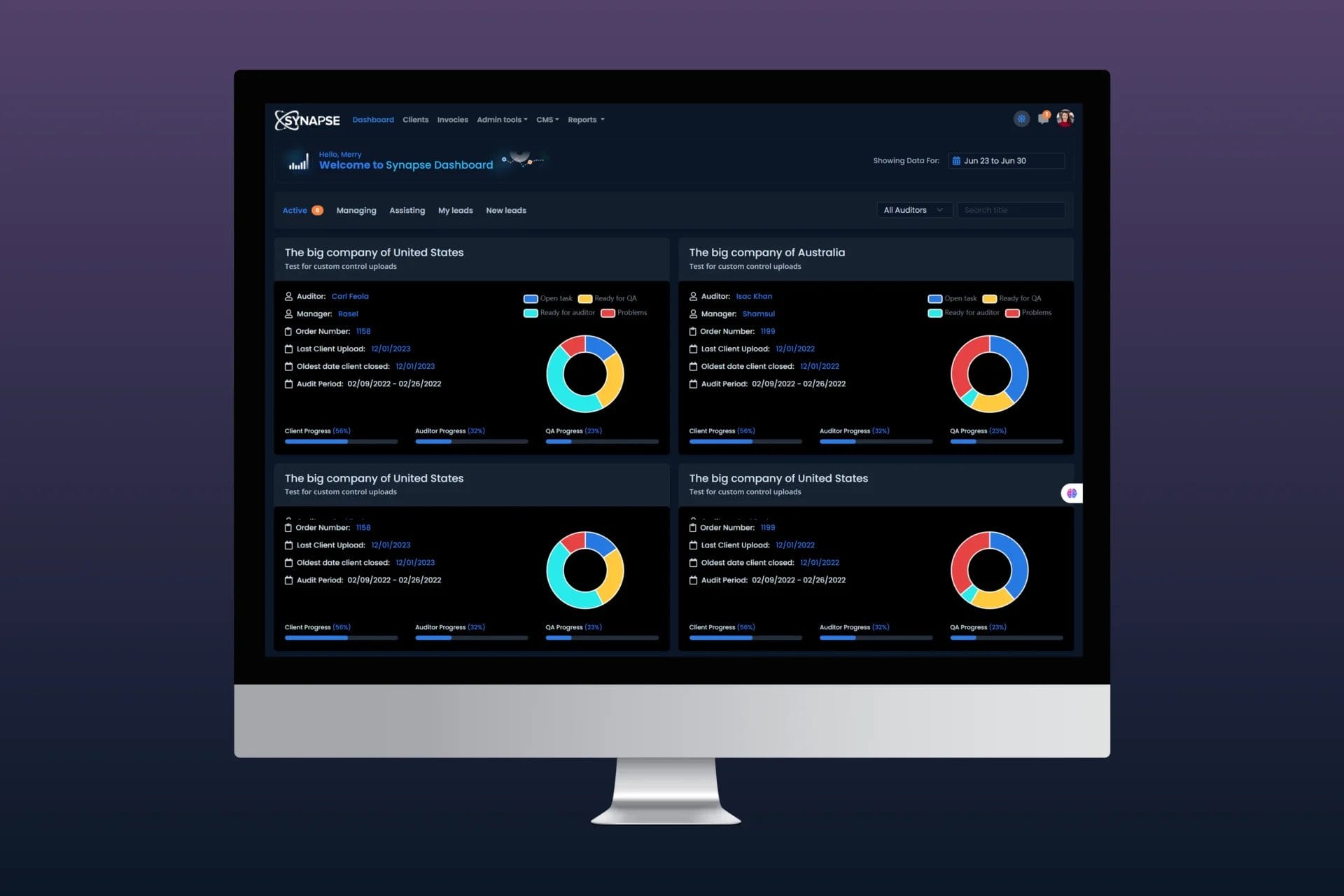
Progress is shown through donut charts and progress bars on every client card. Open Tasks, Ready for QA, Ready for Auditor, and Problems each get their own color. Client Progress, Auditor Progress, and QA Progress appear as labeled bars below. No need to open anything. The status is right there.
The Mapping Flow screen handles the compliance hierarchy. Standards, Principles, Categories, Criteria, and Control Activities all sit in a structured, side-by-side layout. Auditors can navigate through the hierarchy without losing their place.
Client detail pages use tabbed navigation across Company Info, Orders, Client Specific Controls, Quotes, and Others. Within Company Info, the contact section tracks First Name, Last Name, Role, Phone, Email, Automated Emails status, and Contact Type in a sortable table. Date fields track Last Touched, Data Sent, Follow-up Date, Accounting Hold status, and Engagement Letter status.
The whole thing was built with HTML, CSS, JavaScript, and Bootstrap. Clean, maintainable, and fast.
What We Delivered
- A full front-end rebuild for a multi-client healthcare audit platform
- A central dashboard with donut charts and progress bars per engagement
- Audit cards filtered by auditor, manager, date range, and status tabs
- Client detail pages with five content tabs and structured date and contact sections
- A Mapping Flow screen for navigating Standards, Principles, Categories, and Control Activities
- An admin panel covering auditors, invoices, CMS content, and reports
- Responsive Bootstrap layout designed for daily professional use
Impact
Audit managers can now open the dashboard and immediately see where every client stands. No extra clicks. No hunting through menus. The progress indicators do the work.
The Mapping Flow removed a lot of the confusion around compliance hierarchy management. What used to require back-and-forth between different screens now lives in a single structured view.
The client’s team has a front-end that actually matches how they work. The platform went from something people tolerated to something they can depend on.
Industry
Healthcare
Provided Service
UI/UX Design, Front-End Development, Admin Panel
Tech Stack
HTML, CSS, JavaScript, Bootstrap
Location

Michigan