
CRM for Startups in 2026: 7 Proven Tools to Scale Fast


When we talk about startups, it always sounds fascinating, right? The hustle, the innovation, the possibility of building something from scratch. But being a founder isn’t as glamorous as LinkedIn posts make it seem.
The biggest problem you face in a startup isn’t finding product-market fit or raising money. It’s balancing growth with consistency. One month, you’re handling 10 leads manually. The next month, you’ve got 50. Then suddenly 100. Your scrappy spreadsheet system that worked fine at 10 leads? It’s now a complete disaster.
This isn’t your fault. Your product may be solid. Your hustle is real. But your system? It’s broken. And a broken system ultimately kills even the best startups.
And the solution isn’t working harder or getting more organized. It’s getting a CRM for startups that actually handles the chaos of rapid growth. One place where every lead, every conversation, every deal lives. Where your entire team sees what’s happening in real-time.

How a CRM Can Help Your Startup Grow
A startup, especially in the beginning, has to handle a lot every day. From hunting and presenting to investors, iterating on your MVP, to landing first customers, and keeping the team motivated.
Amid this frenzy, customer relationships often slip through the cracks. But according to Harvard Business Review, “acquiring a new customer is anywhere from five to 25 times more expensive than retaining an existing one”. And for a startup, it’s harder than others. A proper CRM can help you manage this whole thing as easily as possible.
Here’s the real impact a CRM delivers:
- Gain insight into performance with sales reports: Investors and VCs want real-time reports and future predictions before investing. And the best way to provide them with that is by having a great dashboard.
- Access customer context at all times: Using a proper CRM will enable you to have every demand and detail about the customer readily accessible to your entire team.
- Keeping track of every lead: A visual pipeline with personalized follow-ups, so that everyone knows exactly where every opportunity stands.
- Organize data and sales activities: Centralize contacts, deals, notes, and tasks in one clean interface, no more digging through Gmail, Slack, or scattered spreadsheets.
- Learning from mistakes: CRM reports and analytics reveal exactly where deals were won or lost, giving startups the hard data to analyze failures, adapt strategies, and restructure more effectively.
What to Look For in a Startup CRM ??
Ever noticed how we all compare features when buying something new? It’s natural. But no matter what you buy, this shouldn’t be the ideal practice. Why??
Because everyone uses tools differently. Picking the right CRM for startups like yours means focusing on these core requirements that actually get the job done.
Here are the 5 issues to address before using a CRM for
1. Can You Actually Get Running in Under an Hour?
Startups must move quickly under constant pressure. You don’t have three weeks for setup. And you need a CRM that works today, not next quarter.
Look for intuitive onboarding and a zero learning curve. If the demo confuses you, feel free to walk away.
2. Picking All-in-One vs. Specialized tools
This is something that trips up most founders. Go for all-in on one platform, or pick specialized tools for each job. Though the “best-of-breed” approach sounds smart until you’re managing five subscriptions, five logins, and spending hours setting up the workflows.
For early-stage startups, an all-in-one platform works better. Fewer tools mean less context-switching, cleaner data, and significantly lower costs.
3. Does It Scale Without Breaking Your Budget?
Free plans sound amazing, until you hit limits mid-deal. Then you’re stuck with enterprise pricing that’s wildly unjustified for your startup stage.
Look for pricing that actually grows with you. The right CRM should have a clear path from where you are now to where you’ll be in 18 months, without forcing you to migrate or pay for features you don’t need yet.
4. What Does “Integration” Actually Mean?
If you love working with multiple tools, make sure that the CRM you choose supports all of them.
If you live in Gmail, get a CRM that actually lives in Gmail. If your team uses Slack, make sure notifications actually flow there.
5. Implementation and Maintenance Headache
Some CRMs require dedicated admin time weekly. Others just work. For startups where everyone wears multiple hats, the lower-maintenance option often delivers better ROI even if the subscription costs slightly more.
The 7 Best CRMs for Startups in 2026
During the span of the last few months, I’ve tested 30+ CRMs from the user’s POV. During this time, I have come across many good and bad CRMs that are suitable for different workflows.
While curating this list, many factors like price point, functionality, and ease of use were considered. Here are the 7 of them that made the cut:
| CRM | Starting Price (per user/mo) | Standout Features | Key Limitations |
|---|---|---|---|
| HubSpot | $0 (Free tier, 2 users) | Contact/deal tracking, Gmail/Slack integrations, basic pipelines | Feature bloat, steep learning curve, paid plans jump to $800/mo |
| Pipedrive | $19 (Lite) | Drag-and-drop deals, email tracking, activity goals | No native invoicing/client portal, sales-only focus |
| OneSuite | $29 (Freelancer, flat) | CRM + projects + invoicing + client portal, e-signatures | Newer platform, basic marketing automation |
| Freshsales | $0 (Free tier, 3 users) | AI lead scoring, built-in email/chat, workflow automation | AI needs data to shine, no PM/invoicing |
| Streak | $59 (Pro) | Pipelines in inbox, email tracking/mail merge, team collab | Gmail-only, security risks if the account is compromised |
| Copper | $25 (Basic) | Auto Gmail/Calendar capture, visual pipelines, Chrome sidebar | Google-only, needs Pro ($59) for automation |
| Folk | $25 (Standard) | Notion-like UI, LinkedIn enrichment, email sequences | No mobile app, basic automation, no forecasting |
1 . HubSpot CRM – The Freemium Industry Giant
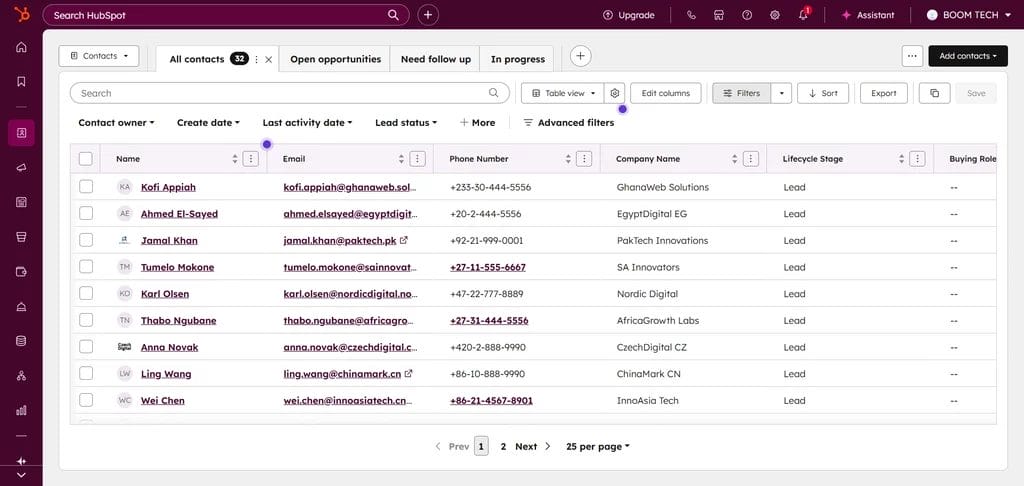
HubSpot is often the first choice because it’s free. For early-stage startups with zero budget, it’s hard to beat. You get contacts, basic pipeline management, and email tracking without paying a dime.
Even if you’re well-funded, money isn’t the issue. Time is. HubSpot’s bloated with features, and onboarding your team eats weeks. In startups where time equals everything and roles overlap, that’s a massive problem.
The “free” tier limits you to 2 users and basic features. It’s designed to upsell premium plans at $800+/month. So, if you are budget-conscious? Better skip it.
Key Features:
- Contact, company, and deal tracking
- Visual pipelines with basic automation
- Reporting dashboards (custom reports locked behind paid plans)
- Integrations with Gmail, Outlook, Slack, Salesforce + more
- Built-in forms and landing pages
- Live chat widget
Pricing:
- Free Tools: $0/month( up to 2 members ) [Basic Features]
- Starter: $20/seat/month [ Many Important Features Missing ]
- Professional: $800/month for 3 seats [additional seats $45/month ]
- Enterprise: $US$3,600/month for 5 seats [additional seats $75/month ]
✔️ PROs |
❌ CONs |
|
Contacts with robust core features |
Steep learning curve and feature bloat overwhelm small teams/time-strapped startups |
|
Best-in-class marketing automation (on paid tiers) |
Complex UI and setup process for beginners |
|
Supports an extensive integration ecosystem |
Paid plans escalate quickly ($800+ monthly) for real functionality |
|
AI features for automation and insights (paid plans) |
Can feel bloated if you just need CRM basics. |
User Feedback
???? I appreciate that it provides a space where we can centralize all of our company data. It allows us to create dashboards, manage staff information, monitor processes, and connect various work tools.
???? HubSpot evolves a lot; however, some workflows that were available on a Pro Sales Hub are now not available anymore. The “Leads” module is really confusing. It’s now evolving for Enterprises and has started to be more complicated to use for a small structure.
2. Pipedrive: Best Visual Pipeline CRM for Deal-Focused Teams
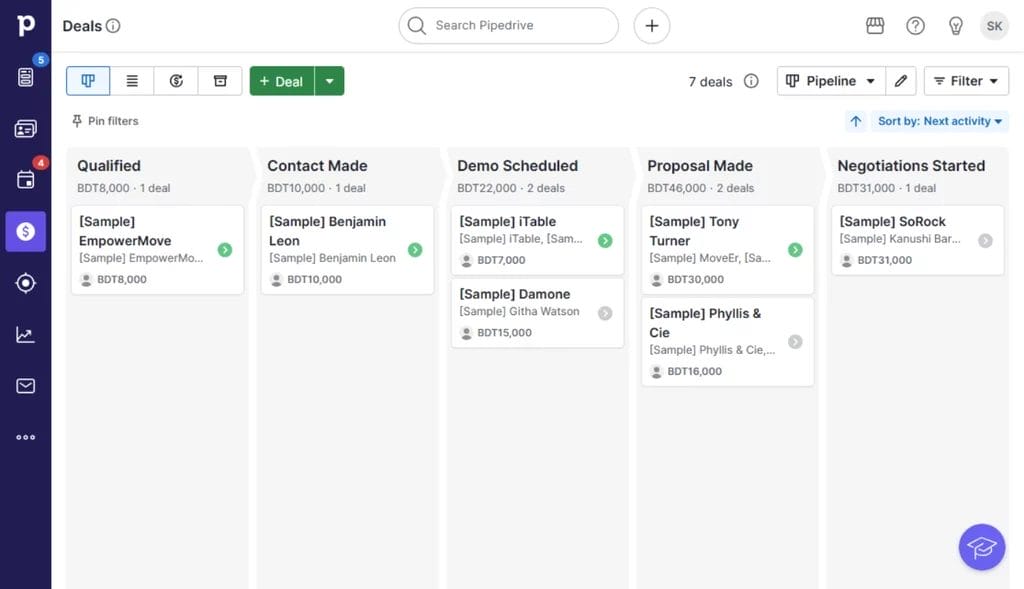
If you love drag-and-drop interfaces, Pipedrive might be well-suited for you. You can see your entire pipeline at a glance, spot where deals are stuck, and track progress without digging through menus.
When you need to see the big picture fast. It’s gonna sound like an option. But it doesn’t really go beyond that. If you need a client portal or invoicing, they don’t have any native option.
Key Features
- Visual pipeline with drag-and-drop deal movement
- Customizable deal stages and workflows
- Activity and goal tracking
- Email integration with tracking
- Smart contact data enrichment
- Web forms for lead capture
Pricing
- Lite: $19/user/month, essential management tools
- Growth: $34/user/month, adds full email sync, automations, nurturing sequences
- Premium: $64/user/month, adds lead generation, scoring, enrichment, and team customization
- Ultimate: $89/user/month, stronger security, data enrichment, sandbox account, enhanced support
✔️ PROs |
❌ CONs |
|
Strong lead management and visual pipeline tracking |
Most advanced features require paid add-ons |
|
Customizable automation streamlines sales tasks |
Very Limited project management without add-ons |
|
Comprehensive reporting and analytics |
E-signature functionality is only available in the Premium plan ($64/user/month) |
|
Integrates with many mainstream apps |
Mainly sales-focused, may not be suitable for SAAS or services. |
User Feedback
???? This tool is extremely helpful for enabling the entire team to see who is handling clients. It also ensures that everyone has access to the necessary information if they need to answer the phone for a query
???? A couple of the prospects were duplicated, as far as I already made a follow-up date to call the customer in 2026, but those particular prospects showed up as ‘overdue’ like I missed their follow-up call. I did not. Seems like anything in 2026 comes back and says ‘overdue.’
3. OneSuite: The Most Practical CRM for Startups
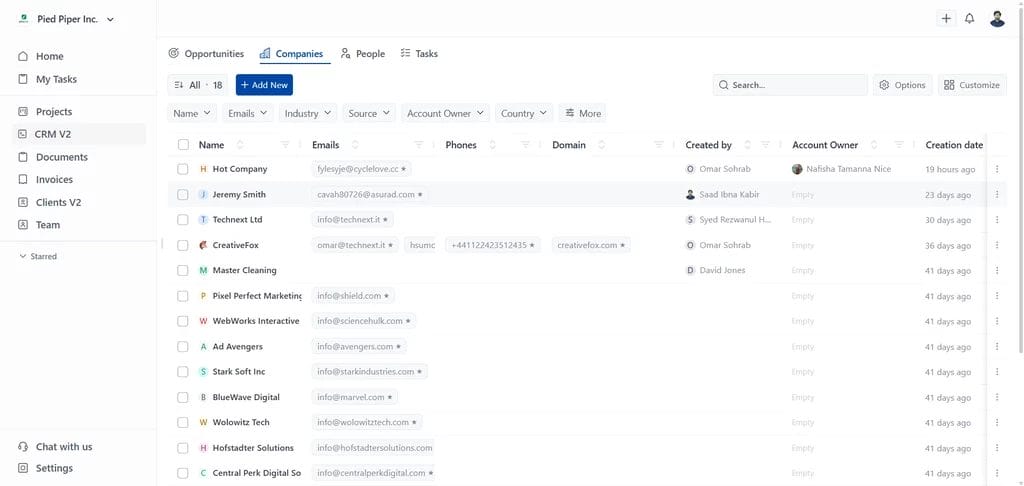
Most startups don’t fail because they chose the wrong CRM. They fail because their tools don’t work together. CRM in one app. Projects in another. Proposals and invoicing are handled elsewhere. Over time, the stack becomes the problem.
OneSuite takes a different approach. Instead of optimizing for a single department, it focuses on how small teams actually operate. Sales, delivery, and billing live in one connected system, not across multiple tools.
Lead → Proposal → Contract→ Project→ Billing→ Upsell
A lead moves through the pipeline. A proposal is created and signed. The deal becomes a project, work is delivered through the client portal, and invoicing pulls directly from project data. No stitched integrations. One product, end to end.
Key Features
- Visual lead pipeline with drag-and-drop stages
- Contact management with full interaction history
- Project management with tasks, deadlines, and client collaboration
- A branded client portal where clients access everything in one place
- Proposal builder with templates and e-signature capability
- Invoicing with payment processing and automatic reminders
Pricing
- Freelancer: $29/month (up to 3,000 leads, 10 GB storage)
- Solopreneur: $59/month (up to 10,000 leads, 30 GB storage)
- Growing Agency: $149/month (unlimited leads, 60 GB storage)
Note: OneSuite offers a 14-day free trial with full feature access. No credit card required upfront.
✔️ PROs |
❌ CONs |
|
True all-in-one (CRM + PM + Invoicing + Client Portal) |
Relatively Newer platform |
|
Clean, intuitive UX for clients to figure out in hours |
No advanced marketing automation |
|
Fast setup (agencies onboarding in hours, not days) |
Limited integrations (Improving Steadily) |
|
Excellent support (responsive, helpful) |
Smaller community (fewer templates/tutorials available) |
User Feedback
???? OneSuite keeps exceeding expectations! Each update improves usability and performance, and the customer service is responsive, knowledgeable, and genuinely invested in my success.
???? As any app that is in their early phase of development, Onesuite has some bugs that need to be ironed out. But none of that them were breaking the operations. They are mostly UI related and I am already seeing them fixing them one be one.
4. Freshsales – An AI-Powered Sales CRM
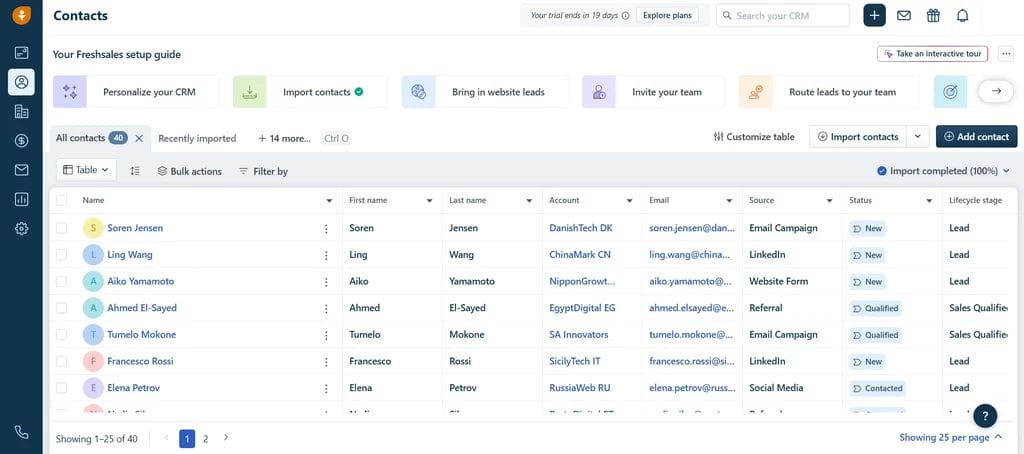
Freshsales is often overlooked, but for startups looking to experience AI without an enterprise-level price tag, it can be a good choice. AI-based lead scoring enables you to focus on the most promising prospects. Intelligent workflow automation handles repetitive tasks. The system actually suggests next actions based on deal history and patterns.
However, the AI features can misfire and produce inaccurate results due to limited data. Some users have also reported poor customer support. Since these features require significant user data to become effective, they can feel more gimmicky than practical for serious users.
Key Features
- AI-powered lead scoring
- Integrated email, phone, and chat
- Workflow automation
- Sales pipeline management
- Third-party app integrations
- Customizable dashboards
Pricing
- Free tier: Up to 3 users
- Growth: $11/user/month
- Pro: $47/user/month
- Enterprise: $71/user/month
✔️ PROs |
❌ CONs |
|
AI-powered lead scoring prioritizes the best prospects |
AI requires historical data, making it of limited value for brand-new startups. |
|
Built-in email reduces integration needs |
The Growth Tier has extremely basic features |
|
Smart automation suggests next actions based on patterns |
Primarily sales-focused, lacks project management, invoicing, and portals |
|
Clean interface that’s easy to navigate |
Mainly product sales-focused, not suitable for service-based startups |
User Feedback
???? Freshsales overall is quite a good product, but sometimes the advanced automation and reporting features seem a bit complex, especially for new users. If there were simpler tutorials or guided setups for these features, onboarding could be even easier.
5. Streak: Best Gmail-Native CRM for Inbox Power Users
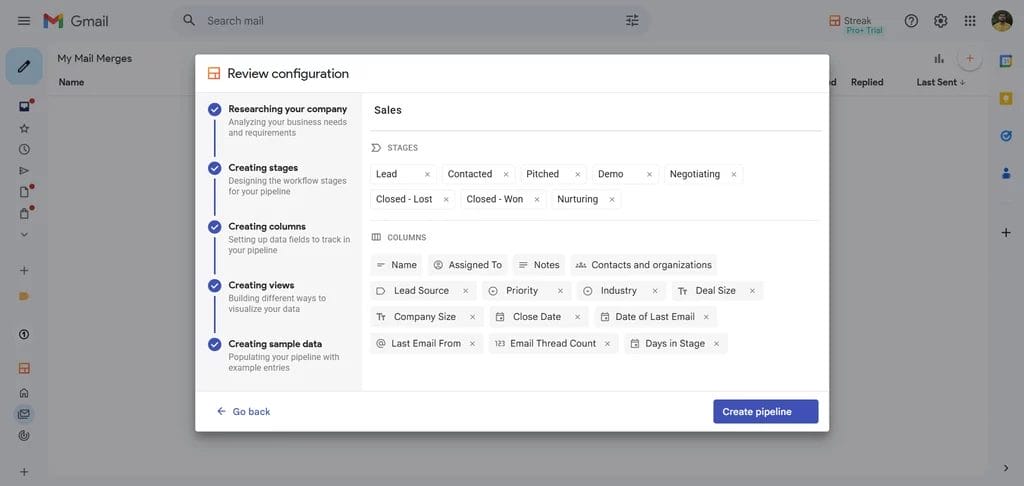
Streak was intentionally built to live entirely within Gmail, with no separate login or app switching required. If you love using Gmail, every email thread can be turned into a trackable deal.
However, if your team uses Outlook or Apple Mail, this becomes immediately unusable for you. Also, it may pose a threat to the customer data if your Gmail account gets compromised by any cyber attacks.
Key Features
- Full CRM capabilities inside Gmail
- Customizable pipelines for workflows
- Email tracking and mail merge
- Collaboration on contacts, emails, and files
- Mobile app support
Pricing
Pro: $59 per user/month
Pro+: $89 per user/month
Enterprise: $159 per user/month
✔️ PROs |
❌ CONs |
|
Natively integrates with Gmail |
Limited outside the Gmail ecosystem |
|
Customizable pipelines |
Not suitable for non-Google Workspace users |
|
Includes email tracking, scheduling, and mail merge |
Can clutter your mails |
|
Enables team collaboration inside the inbox |
Security issues may arise if Gmail gets compromised |
User Feedback
???? I have been using streak for a long time now and it has made email tracking very easy for us. With the way it gets integrated with Gmail it helps us track and view all emails sent to Clients and candidates. In this way we get to know when the email has been viewed and not and accordingly plan the next step.
???? I find the initial learning curve of Streak to be quite steep, which made getting accustomed to it a bit challenging. Additionally, the setup process is not as straightforward as I would like; it takes some time to properly get everything configured.
6. Copper: Best CRM for Google Workspace Teams
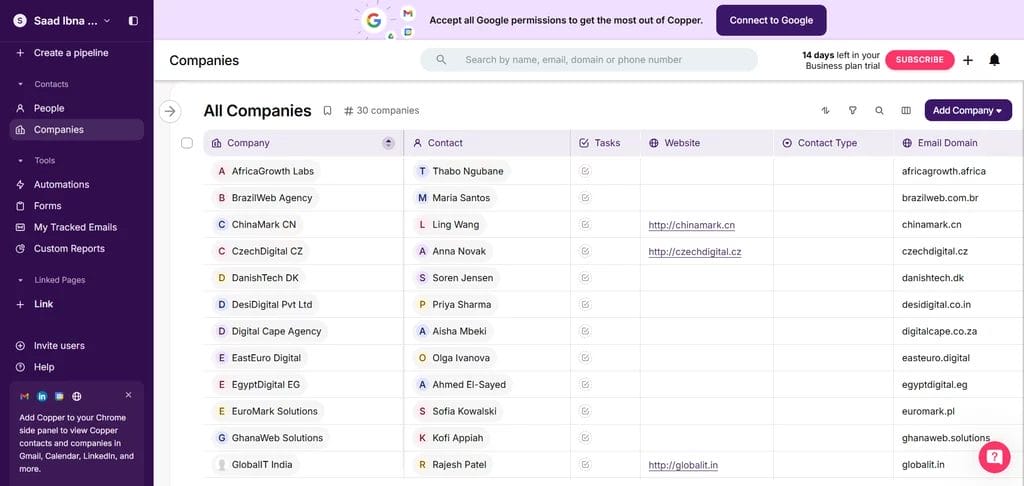
Copper is basically Streak’s more mature, feature-rich cousin. It’s the only CRM actually “Recommended for Google Workspace” by Google themselves, offering deep native integration with the entire Google ecosystem.
Still Google-only. So concerns remain. If your team isn’t all-in on Google Workspace, Copper loses its main advantage. Pricing starts at $25/user/month, but realistically, you’ll need the $59 Professional plan for workflow automation and better reporting.
Key Features
- Native Gmail, Google Calendar, and Google Drive integration
- Automatic contact and email capture
- Visual pipeline management
- Project management capabilities
- Workflow automation
- Chrome extension for Gmail sidebar access
Pricing
- Basic: $25/user/month (core CRM features)
- Professional: $59/user/month (automation and advanced reporting)
- Business: $99/user/month (full feature set)
- 14-day free trial, no credit card required
✔️ PROs |
❌ CONs |
|
Deep Google Workspace integration, data flows automatically |
Google-only focus loses value if not all-in on the Google ecosystem |
|
Automatic data capture from Gmail minimizes manual entry |
Realistically need $59/user Professional plan for automation and reporting |
|
Full-featured CRM with project management capabilities |
Interface feels more traditional CRM than modern startup tool |
|
Chrome extension surfaces CRM data in Gmail sidebar |
Learning curve beyond “just using Gmail.” |
User Feedback
???? I really like how Copper automatically organizes the leads you add. It gives you the tools to stay connected with your clients, follow up on time, and avoid losing opportunities. It helps maintain better communication and overall stronger relationships with them.
???? Advanced features like detailed reporting, workflow customization, and email sequencing are locked behind premium tiers, and it’s heavily tied to Google limits flexibility for non-Gmail users
7. Folk CRM: Best Modern Relationship CRM with Notion-Like Flexibility
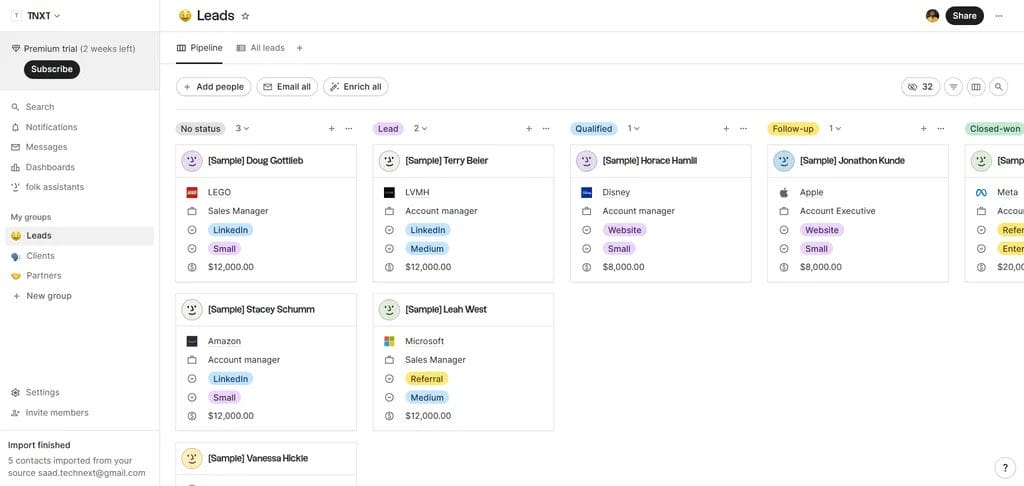
Imagine Notion’s gorgeous interface meets actual CRM power, for teams who care about relationships over rigid pipelines. Folk CRM is a very good option for its clean, spreadsheet-style, insanely intuitive UI, too.
But the basic automation, lack of some features, and no mobile app support make it slightly less than the competition.
Key Features
- Flexible, spreadsheet-like interface
- LinkedIn integration for seamless prospecting
- Automatic contact enrichment
- Email sequences and campaigns
- Multiple pipeline views
Pricing
- Standard: $25/member/month
- Premium: $50/member/month
- Custom: $100/member/month
✔️ PROs |
❌ CONs |
|
Stunning interface, clean, modern, actually enjoyable to use |
No mobile app, web interface works, but no native iOS/Android |
|
Seamless LinkedIn integration for B2B prospecting |
Automation is basic compared to mature platforms |
|
Automatic contact enrichment saves hours of manual data entry |
Missing advanced CRM features (forecasting, territory management) |
|
Flexible structure adapts to your workflow, not vice versa |
Price climbs quickly with team growth |
User Feedback
???? I love how simple and intuitive Folk is, which makes managing contacts, tracking conversations, and staying on top of follow-ups effortless. The seamless integration of notes, reminders, and email tracking in one place truly streamlines my workflow and enhances my efficiency in managing relationships
???? Still rough around the edges and having some issues regarding the bulk email sending and related analytics not working.
Which CRM Fits YOUR Startup?
If you are just testing an idea or running on zero budget, a free CRM can help you get started. Tools like HubSpot or Freshsales give you basic pipelines and contact management. They work fine early on, but you will quickly hit limits as soon as your team grows or your workflow becomes real.
If your startup is sales-focused and you already have deal data, Freshsales might make sense. Its AI helps prioritize leads and automate follow-ups. But it stays narrow. Once you need projects, billing, or client collaboration, you are back to adding more tools and more costs.
If you work mostly using Gmail or Google Suite, then Streak or Copper might make more sense.
If you want one system that grows with you, OneSuite is the most practical choice
It connects CRM, projects, invoicing, and client portals in one place. And the best thing?? The simple, bloat-free, intuitive UI makes the onboarding process smooth.
You are not paying per feature or forced into upgrades just to keep working. For startups and agencies that care about simplicity, cost control, and day-to-day execution, OneSuite delivers what most CRMs promise but never fully give.
FAQs
When should a startup get a CRM?
The moment you can’t track all your customer interactions mentally. For most startups, this happens around 20-30 active leads or customers.
Free CRM vs paid CRM, what’s the catch?
Free CRMs (like HubSpot or Zoho’s free tier) work for basic needs but limit users, contacts, or features. But you’ll hit those limits exactly when growth accelerates. Paid CRMs offer automation, better reporting, more customization, and scale without sudden restrictions. Start free if budget demands it, but plan to upgrade as you grow.
How much does a startup CRM cost?
Expect $10-50 per user per month for most startup-appropriate CRMs. HubSpot and Zoho offer freemium plans. Pipedrive starts at $14/user/month. Salesforce Essentials runs $25/user/month. OneSuite consolidates multiple tools, often saving money overall.
Can I use a CRM if I’m non-technical?
Absolutely. Modern CRMs like OneSuite, Pipedrive, and Freshsales are built for non-technical users. Look for intuitive interfaces, pre-built templates, and drag-and-drop configuration.
What if my team resists using CRM?
Resistance usually means the CRM creates more work without delivering obvious value. Choose a CRM like OneSuite that has little to no
Can a CRM help with investor reporting?
Yes, significantly. Investors want CAC (customer acquisition cost), LTV (lifetime value), conversion rates, churn, and pipeline health. A CRM automatically tracks these metrics from your actual deal data. You’ll walk into investor conversations with real numbers, not guesswork

Globally Recognised by B2B marketplaces


Kick start with your dedicated squad in Technext
Skip the hiring headache. NDA first, transparent rates, agile delivery from day-1.
No commitment • Reply within 2hrs

S. Polash
Sr. Engineer

Reza H.
Project Manager

Desh C.
Lead Developer

Imran K.
UI/UX Lead

